
CS2 Trade Holds and Cooldowns in 2026: How Long You Actually Wait
 CornieEditor & Lead ReviewerAugust 4, 2026 7 min read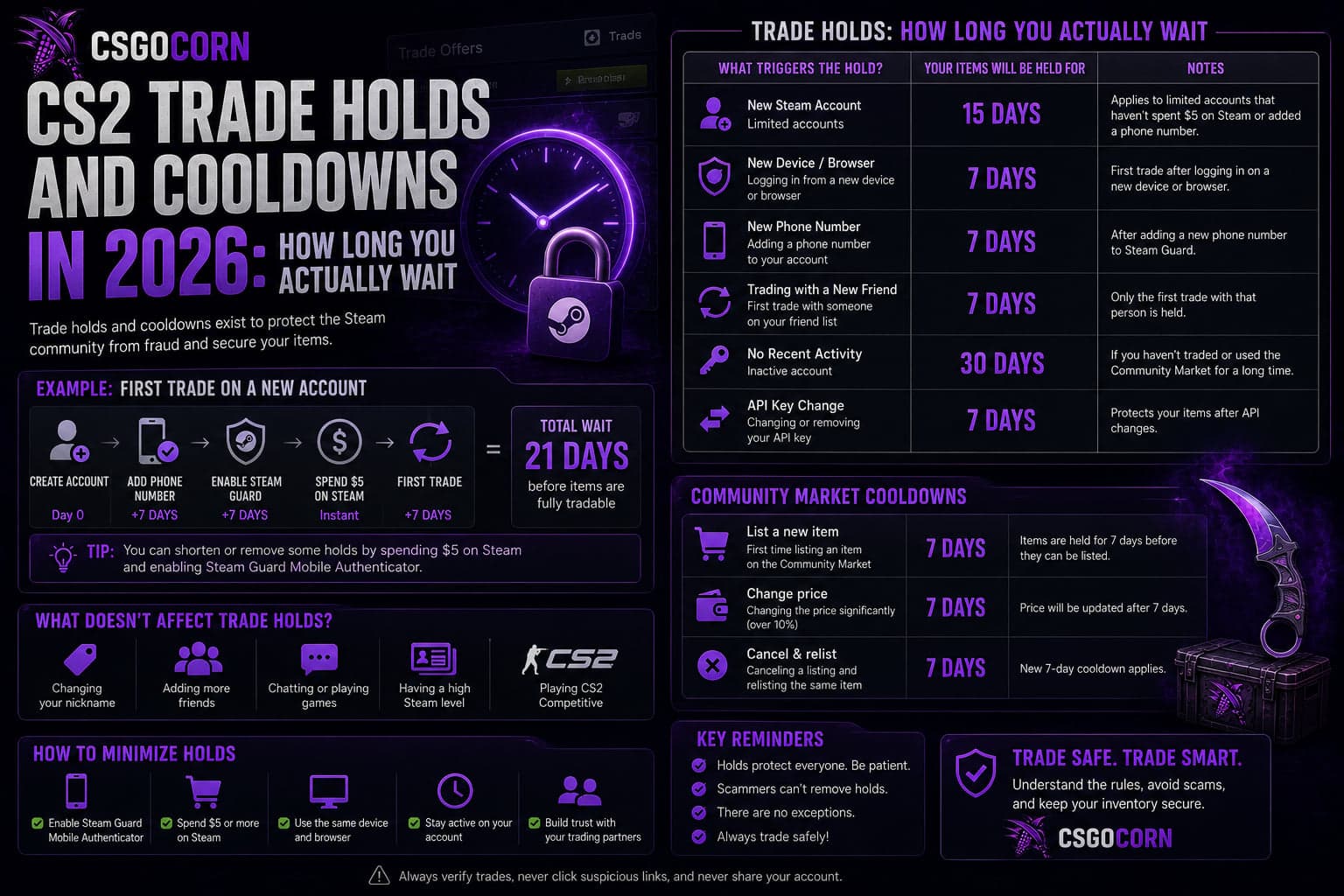
A trade hold is the period during which a skin sits in your inventory unable to move. It is not a punishment and it is not a bug — it exists so that a compromised account can be recovered before the items are gone for good. But it also decides when your item becomes liquid, which makes it a direct trading concern rather than a technicality.
Valve reworked how these timers are calculated, and the change is worth understanding properly because it moved the goalposts for anyone who plans trades around unlock times.
The current rule: seven days, counted per item
Items acquired through the Steam Community Market or through a trade become tradable again seven days later. The important detail is how those seven days are counted.
Under the old system, everything unlocked at a fixed time: no matter when during the day you completed a trade, the cooldown expired at 9 AM on the eighth day. That produced a daily flood of items becoming tradable simultaneously.
The current system runs a per-item timer instead. A cooldown ends exactly 7 × 24 hours after the item entered your inventory, matched to the hour you acquired it. Accept a trade at 3 AM and it unlocks at 3 AM seven days later. Buy at 1 PM and it unlocks at 1 PM.
Why the change matters
- Supply is smoother. Items no longer arrive on the market in one daily wave, which takes some of the sharpness out of the price movements that used to cluster around the unlock hour.
- Your planning is more precise. You now know the exact hour an item frees up rather than "some time tomorrow morning".
- Timing your purchase matters slightly. Buying at an awkward hour means unlocking at that same awkward hour a week later.
The Steam Mobile Authenticator: the one thing that removes holds
Direct player-to-player trades behave differently depending on account security.
- Without the Steam Mobile Authenticator, trades carry a hold before the items can be traded onward.
- With the authenticator active for at least seven days, trades to other mobile-confirmed accounts complete with no hold at all.
- Trading to an account without it still carries the hold, regardless of your own setup.
That last point catches people out. Your security setup protects the trade from your side, but the counterparty's setup matters too. If you are selling into a service and want an instant turnaround, both ends need to be properly configured.
Enabling the authenticator and waiting out its own seven-day activation period is the single highest-value thing a new trader can do. It removes friction from every future trade and it materially protects the account.
Trade holds are not trade bans
These get conflated constantly, and they are unrelated:
- A trade hold is a temporary timer on a specific item. It expires on its own.
- A trade ban is an account-level restriction applied by Valve, usually after a scam report or a payment dispute. It does not expire on a schedule.
- A VAC ban relates to cheating and affects matchmaking; items in a VAC-banned account's inventory become untradable.
If you are buying an account-bound item from a stranger, an account-level restriction on their side is a far bigger problem than a hold on the item.
How holds affect where you sell
This is where the mechanic turns into a real decision. A held item cannot be sold anywhere, on any venue, until the timer expires. So the question is not how to avoid the hold — it is how to plan around it.
- Buying to flip. Factor a week of price risk into every purchase. The market you sell into is not the market you bought from.
- Selling for cash. If you need money quickly, check the hold status before you commit to a deadline. An instant cashout site is only instant if the item is actually tradable.
- Marketplace listings. Some marketplaces let you list held items so they sell the moment the hold expires. Whether that suits you depends on how much price movement you are willing to accept in the gap.
How holds behave on third-party sites
Third-party marketplaces sit on top of Steam's trading system, so they inherit its rules exactly. A site cannot receive a held item any more than a friend can. What differs is how each platform handles the wait, and the differences are worth knowing before you commit:
- Bot-based instant sell. The item must transfer to the site's bot account, so it has to be tradable. A held item simply cannot be sold this way until the timer expires.
- Peer-to-peer listings. Some platforms let you list an item that is still on hold, so it goes live the moment it unlocks. Convenient, but you are committing to a price now for a sale that completes later.
- Buying from a peer-to-peer market. The item transfers directly from another player, which means it arrives with a fresh seven-day hold of its own.
That last point catches out anyone planning a quick flip. Buying on a peer-to-peer marketplace and reselling immediately is not possible — the clock restarts with every transfer.
Planning around the hold instead of fighting it
Once you accept the week, it becomes a planning input rather than an obstacle:
- Stagger purchases. Buying everything on one day means everything unlocks on one day, concentrating your price risk into a single moment.
- Keep a tradable reserve. If you trade regularly, holding some items that are already unlocked means you are never fully illiquid.
- Note the unlock hour. Now that timers are per item, you know exactly when each one frees up rather than guessing.
- Do not commit to a deadline you cannot meet. If someone needs an item today and yours unlocks Thursday, say so upfront rather than hoping.
Common misconceptions
"Cancelling and re-sending resets the timer"
It does not. The clock is attached to when the item entered the inventory, not to trade attempts.
"Gifting to an alt clears the hold"
The opposite. Moving a held item is exactly what the hold prevents, and moving an unheld item to another account starts a fresh timer there.
"Paying for a service removes holds"
Nobody can remove a Steam trade hold. Any service claiming otherwise is either misdescribing what it does or is a scam — and this is a common enough pitch that it deserves naming. Our guide on spotting skin scams covers the pattern.
A short checklist before you trade
- Mobile authenticator enabled and past its own activation window.
- Counterparty's hold status confirmed before agreeing to timing.
- Purchase timing chosen with the unlock hour in mind if it matters to you.
- Price risk over the hold period priced into the deal.
Frequently Asked Questions
How long is a CS2 trade hold?
Seven days, counted as 7 × 24 hours from the moment the item entered your inventory, so it expires at the same time of day you acquired it.
Can I remove a trade hold?
Not on an item that already has one. You can prevent future holds on player-to-player trades by using the Steam Mobile Authenticator, provided the other account uses it too.
Do items bought on the Steam Community Market have a hold?
Yes. Market purchases become tradable roughly seven days later, on the same per-item timer.
Why did the unlock time change from 9 AM?
Valve moved from a fixed daily unlock to individual per-item timers. Cooldowns now expire exactly seven days after acquisition rather than all together each morning.
Does a trade hold stop me using the skin in game?
No. A held item is fully usable — equip it, play with it, inspect it. The restriction is only on moving it to another account.
The short version
Seven days, timed to the hour you received the item. The mobile authenticator is the only legitimate way to avoid holds on direct trades, and it only works when both sides have it. Plan for the week rather than trying to beat it.
Ready to pick one? We tested and ranked the CS2 gambling sites — deposits, payouts, bonus terms and all.
See the tested CS2 gambling sitesRelated posts
How to Read the CS2 Skin Market: Price History, Volume and Timing
Most people check one price and call it research. This guide covers what a price chart actually tells you, why trade volume matters more than the headline number, the events that move the market, and how to avoid the mistakes that cost traders money.
CS2How to Spot a CS2 Skin Scam: Red Flags Every Trader Should Know
Skin scams work because they exploit urgency and trust, not technical weaknesses. This guide breaks down the API key hijack, the fake middleman, the impersonated marketplace and the quick-swap, plus the habits that make you a hard target.
CS2CS2 Skin Patterns Beyond Blue Gem: Fade, Doppler, Marble Fade and Case Hardened
Pattern index is the hidden number that turns an ordinary skin into a four-figure one. This guide explains how pattern seeds work, what makes a high Fade percentage, how Doppler phases are priced, and which patterns are worth hunting.