
CS2 Float and Wear Conditions Explained: What the Number Actually Means
 CornieEditor & Lead ReviewerAugust 4, 2026 8 min read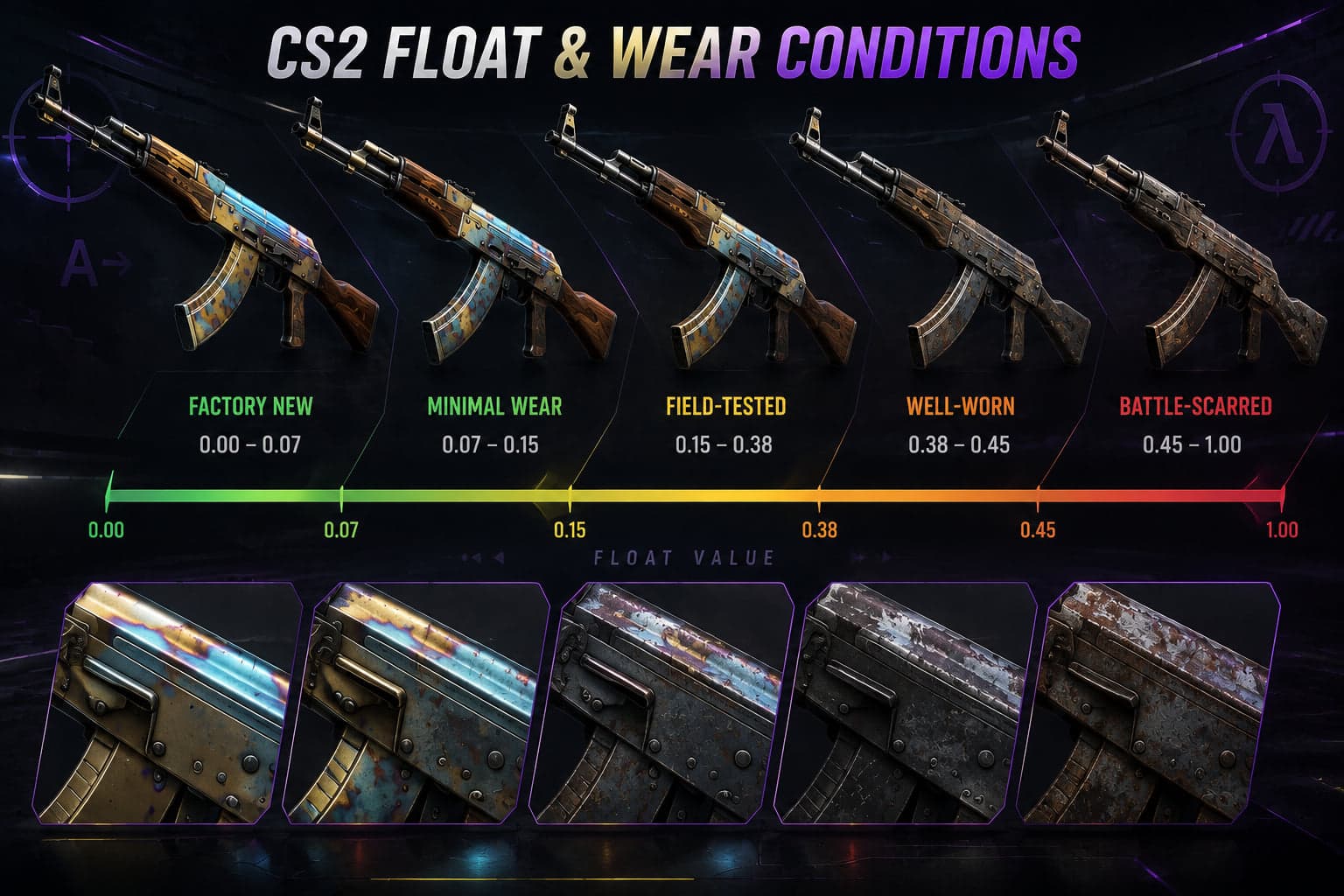
Every CS2 skin carries a hidden number between 0 and 1 called its float value. It is generated the moment the item is created and it never changes. That single decimal decides which wear label the skin wears in your inventory, how scratched it looks in game, and — more than most new traders expect — what it is worth when you sell it.
Understanding float is the difference between paying a fair price and overpaying by a wide margin for a skin that looks identical from two metres away. This guide covers what the number is, where the boundaries sit, and the cases where the conventional wisdom is simply wrong.
The five wear conditions and their exact ranges
CS2 sorts every float value into one of five buckets. The boundaries are fixed and identical across every weapon in the game:
- Factory New — 0.00 to 0.07
- Minimal Wear — 0.07 to 0.15
- Field-Tested — 0.15 to 0.38
- Well-Worn — 0.38 to 0.45
- Battle-Scarred — 0.45 to 1.00
Notice how uneven those buckets are. Factory New spans just seven hundredths of the scale. Field-Tested spans twenty-three, and Battle-Scarred swallows more than half the range on its own. That asymmetry is the root of almost everything else in this article: a Field-Tested skin at 0.16 and a Field-Tested skin at 0.37 carry the same label and can look meaningfully different.
Why the same wear tier can look completely different
Wear is applied as a texture overlay, and how visible it becomes depends entirely on the skin's finish. On a dark, busy pattern the scratches disappear into the artwork. On a clean, single-colour finish they read as obvious scuffing. This is why blanket advice like "always buy Minimal Wear" falls apart in practice — the right tier is a property of the specific skin, not a universal rule.
Float caps: why some skins never appear Factory New
Not every skin can roll the full 0 to 1 range. Each finish has a minimum and maximum float defined by its creator, and the game generates values only inside that window. Some skins are capped so that Factory New is impossible; others start so low that Battle-Scarred never occurs.
This matters when you are shopping. If a skin's cap means its lowest possible float is 0.10, then a 0.10 example is the best that will ever exist — and it will command a premium among collectors even though it is "only" Minimal Wear. Chasing a Factory New that cannot exist is a common way to waste an afternoon.
Low float premiums: when they are real and when they are not
There is a genuine, liquid market for extreme floats. It concentrates in a few predictable places:
- Boundary floats. A Field-Tested sitting at 0.1501, barely over the Minimal Wear line, looks nearly identical to a Minimal Wear but is priced in the cheaper tier. These are hunted deliberately.
- Sub-0.01 Factory New. On expensive knives and rifles, a float in the thousandths carries a collector premium that has held up over years.
- Capped-skin extremes. The lowest achievable float on a capped finish, as described above.
Outside those cases, the premium thins out fast. Paying 30% extra to move from 0.09 to 0.08 on a mid-tier skin buys you a difference nobody will ever notice, and it is money you will not recover at resale. The buyer you eventually sell to is running the same calculation you should be running now.
The practical test
Before paying a low-float premium, ask one question: would a buyer be able to tell without opening an inspection link? If the answer is no, you are paying for a number rather than for an item, and that number only holds value while other people agree it does.
How to check a float before you buy
Inspect links expose the exact float of a specific item, and every reputable marketplace surfaces it in the listing. If a listing does not show the float and does not offer an inspect link, treat that as a reason to look elsewhere — on a market where floats are visible everywhere, hiding one is a choice.
This is one of the clearest practical differences between trading venues. The Steam Community Market does not display float values at all, which is precisely why float-sensitive buyers do their shopping on third-party CS2 marketplaces where the number is part of the listing.
Float and StatTrak, souvenirs and stickers
Float is independent of every other property an item can carry. A StatTrak skin has its own float rolled the same way; so does a souvenir. Applying stickers does not change the float, and neither does using the item in matches — the number is fixed at creation and is not a durability meter that degrades over time. Plenty of newer players assume otherwise.
Float and trade-up contracts
Trade-up contracts are the one place where float stops being a cosmetic concern and becomes a calculation. When you trade ten skins of one rarity up to the next, the float of the item you receive is derived from the average float of the ten you put in, scaled into the output skin's own float range.
Two things follow, and both are commonly misunderstood:
- Low-float inputs produce low-float outputs. If you want a Factory New result, you need inputs whose average sits low in their own ranges — not merely inputs that happen to be labelled Factory New.
- The output's float cap still applies. Feeding in ten pristine skins does not produce a Factory New if the output finish is capped above 0.07. The average is mapped into whatever range the output skin actually has.
This is why cheap Battle-Scarred inputs and cheap Factory New inputs are priced so differently by people who run trade-ups seriously. They are buying a position in a range, not a label.
Reading a listing properly
When you are looking at a specific item rather than a price chart, four numbers together tell you what you are buying:
- The float itself, to four decimal places if the listing offers it. "Minimal Wear" is a bucket, not a value.
- Where that float sits inside its tier. 0.0701 and 0.1499 are both Minimal Wear and are not the same item.
- The finish's own float range, which decides whether the number is impressive or ordinary.
- The inspect link, so you can see the thing rather than reading about it.
If a listing gives you the tier and nothing else, you are being asked to buy blind on the attribute that most affects price. That is a reasonable trade for convenience on a cheap skin and a poor one on an expensive skin.
What float means when you are selling
If you are cashing out rather than collecting, the honest summary is that float matters at the extremes and barely anywhere else. A mid-range float in a common tier sells at the going rate for that tier, and no amount of describing it as "clean" will move the price. Where float does pay is when you hold a boundary float or a genuine sub-0.01, in which case selling on a venue that displays floats is worth far more to you than the convenience of a quick instant cashout.
Frequently Asked Questions
Does a CS2 skin's float change as I use it?
No. The float is generated once, when the item is created, and it is permanent. Playing hundreds of matches with a skin will not wear it down further, and storing it will not clean it up.
What is the lowest float possible in CS2?
The theoretical floor is 0.00, but each individual finish has its own minimum. Many skins are capped well above zero, so the practical lowest float depends entirely on which skin you are looking at.
Is Factory New always the best value?
No. Factory New is the most expensive tier, but on dark or heavily patterned finishes the visual difference against Minimal Wear or even a low Field-Tested is close to invisible in game. Those skins are usually the better buy.
Why do two Field-Tested skins have very different prices?
Usually because of float position within the tier, pattern index, applied stickers, or StatTrak status. A 0.1502 Field-Tested sits right on the Minimal Wear boundary and is worth noticeably more than one at 0.37.
Can I see the float of an item on the Steam Community Market?
Not directly in the listing. You can pull it from an inspect link, but third-party marketplaces display it up front, which is why float-focused buyers tend to shop there.
The short version
Float is a fixed decimal that decides a skin's wear label and part of its price. The tiers are unevenly sized, so position inside a tier matters as much as the tier itself. Premiums are real at boundaries and at genuine extremes, and mostly imaginary everywhere else. Check the number before you buy, and be honest with yourself about whether anyone will ever see the difference.
Ready to pick one? We tested and ranked the CS2 gambling sites — deposits, payouts, bonus terms and all.
See the tested CS2 gambling sitesRelated posts
How to Read the CS2 Skin Market: Price History, Volume and Timing
Most people check one price and call it research. This guide covers what a price chart actually tells you, why trade volume matters more than the headline number, the events that move the market, and how to avoid the mistakes that cost traders money.
CS2How to Spot a CS2 Skin Scam: Red Flags Every Trader Should Know
Skin scams work because they exploit urgency and trust, not technical weaknesses. This guide breaks down the API key hijack, the fake middleman, the impersonated marketplace and the quick-swap, plus the habits that make you a hard target.
CS2CS2 Skin Patterns Beyond Blue Gem: Fade, Doppler, Marble Fade and Case Hardened
Pattern index is the hidden number that turns an ordinary skin into a four-figure one. This guide explains how pattern seeds work, what makes a high Fade percentage, how Doppler phases are priced, and which patterns are worth hunting.